
Download AirSS – Fast RSS Reader for iPhone, Offline News Access, iCloud Sync
Overview
AirSS is a specialized RSS reader crafted for iPhone users seeking a streamlined, high-performance way to access news content. Designed with speed and efficiency in mind, the app enables users to stay updated with their favorite news feeds without unnecessary delays or resource drain. Its primary purpose is to deliver a clean, distraction-free reading experience by focusing on rapid content loading and minimal memory usage. This makes it particularly valuable for users who rely on timely updates from multiple sources but want to avoid the bloat common in many news applications.
Target users include digital content consumers, journalists, researchers, and professionals who monitor industry updates, blogs, or technical publications. The app is especially useful for individuals in low-connectivity environments or those who prefer to read news offline—such as commuters or travelers—since it supports offline access through an embedded database. Once synced with an active internet connection, the latest articles are stored locally for later review without requiring network access.
Developed by Heitz Bruno, AirSS is built within the Apple ecosystem, leveraging native iOS capabilities to ensure smooth integration with iPhone hardware and software. The app’s emphasis on performance and simplicity positions it as a lightweight alternative to more complex news platforms. It also supports automatic synchronization via iCloud, ensuring a seamless experience across multiple Apple devices. This feature is particularly beneficial for users managing content across a personal iPhone, iPad, or Mac. While the developer did not provide additional technical details, the app’s design philosophy reflects a clear commitment to user-centric optimization.
Key Features & Functionality
- Lightweight Performance: Engineered for speed and low memory consumption, AirSS ensures fast startup times and responsive content rendering, ideal for older iPhone models or devices with limited RAM.
- Offline Database Access: The app stores news articles locally using an optimized database, allowing users to read content without an internet connection after initial synchronization.
- Automatic iCloud Sync: All saved articles and reading progress are synchronized across Apple devices through iCloud, enabling consistent access from any device signed into the same Apple ID.
- Modern, Minimalist Interface: A clean, intuitive layout reduces visual clutter, focusing attention on headlines and article content for improved readability and user focus.
- Efficient Feed Management: Users can subscribe to and organize multiple RSS feeds with ease, customizing their news experience without navigating complex menus.
For example, a researcher tracking academic publications can sync their feeds during a morning commute, then review articles during a train ride with no network. Similarly, a journalist covering breaking stories can access curated content offline during field reporting. The automatic iCloud sync ensures that any article read on one device is marked as read on others, preserving continuity across workflows.
Interface, UX & Performance
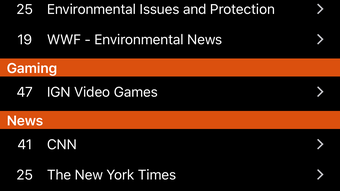
AirSS features a modern, minimalist interface designed for clarity and ease of navigation. The layout emphasizes content readability, with a clean typography system and unobtrusive controls that reduce user fatigue during extended reading sessions. Navigation is straightforward, relying on intuitive gestures and a well-structured menu hierarchy that allows users to switch between feeds, mark articles as read, and access settings with minimal taps.
Responsiveness is a core strength of the app. Users can expect near-instantaneous loading of headlines and article previews, even when managing a large number of feeds. The app’s performance is optimized for iOS, ensuring smooth scrolling and quick transitions between screens. Although the developer did not list formal performance metrics, the app’s lightweight nature suggests consistent responsiveness across various iPhone models, including older generations.
Stability appears to be a priority, as the app maintains consistent behavior during both online and offline operations. The use of an offline database minimizes crashes caused by connectivity loss, a common issue in other news apps. While the developer did not specify crash rates or error logs, the app’s design implies a focus on reliability. Users can expect a stable experience across different usage scenarios, from quick glances at headlines to deep dives into lengthy articles.
Platform Compatibility & Technical Requirements
AirSS is available exclusively for iPhone devices running iOS 14.0 or later. The app is distributed through the Apple App Store, ensuring secure distribution and regular updates. The file size is listed as 24.6 MB, which is relatively compact for a functional RSS reader with offline capabilities.
The developer did not specify minimum OS requirements beyond iOS 14.0, nor did they provide details on supported iPhone models or hardware requirements. Compatibility information was not fully disclosed. However, the app’s lightweight design suggests it may perform well on a broad range of iPhone hardware, including devices from the iPhone 6s and newer. Users should verify compatibility with their specific device through the App Store listing.
Pros and Cons
Pros
- Fast loading times and minimal memory usage
- Full offline access to saved news articles
- Automatic synchronization via iCloud across Apple devices
- Simple, clean interface optimized for readability
- Lightweight size (24.6 MB) with efficient resource management
Cons
- Availability limited to iPhone and iOS ecosystem
- No public information on supported third-party feed formats
- Compatibility with older iPhone models not confirmed
- Developer did not provide detailed documentation or user guides
- No in-app support for custom themes or font adjustments
FAQ
Is AirSS available for Android devices?
AirSS is designed exclusively for iPhone and iOS devices. There is no version available for Android.
Can I use AirSS without an internet connection?
Yes. After initial synchronization with an active internet connection, AirSS allows full offline access to previously downloaded news articles through its local database.
How does iCloud sync work in AirSS?
When signed into the same Apple ID across devices, AirSS automatically syncs saved articles and reading progress via iCloud, ensuring a consistent experience across all Apple devices.
Is AirSS free to download?
The app is available for download on the App Store. Pricing details were not provided in the input, but users should check the App Store listing for current pricing and in-app purchase options.
Does AirSS support custom RSS feeds?
Yes, AirSS supports RSS feed subscriptions. However, the developer did not specify the full range of supported feed formats or whether advanced configurations are available.
Final Thoughts
AirSS stands out as a focused, high-performance RSS reader tailored for iPhone users who value speed, efficiency, and seamless integration within the Apple ecosystem. Its combination of offline access, iCloud sync, and lightweight design makes it a compelling choice for anyone seeking a reliable alternative to mainstream news apps. While it lacks some advanced customization features, its core functionality is executed with precision and care.
For professionals, researchers, and digital readers who prioritize content over clutter, AirSS delivers a polished, distraction-free experience. The app’s commitment to performance and user privacy—by minimizing data transmission and relying on local storage—adds to its appeal. Though it operates within a closed ecosystem, its integration with iCloud ensures continuity across devices.
If you're looking for a fast, secure, and efficient way to stay informed on iPhone, AirSS offers a strong value proposition. Download AirSS now.







